DeepSeek Harness Preview
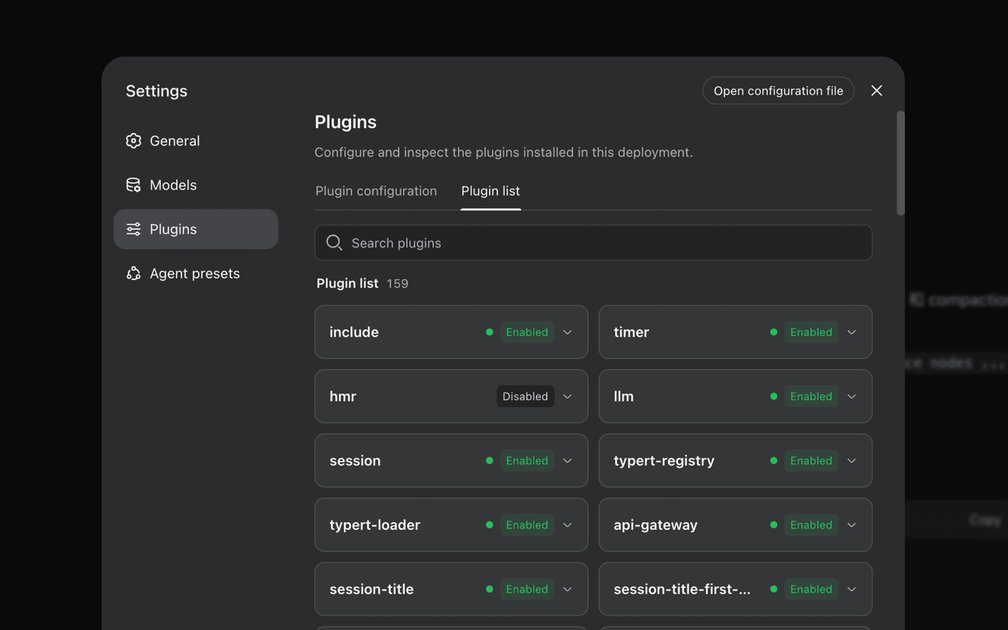
I've been following the development of DeepSeek Harness, and I have to say, the fact that it's now in developer preview with its source code available is a big deal. Every capability in DeepSeek Harness is designed as a plugin, which means developers can swap or recompose models, tools, skills, sessions, sandboxes, storage, loops, scheduling, and even the UI. This level of modularity is impressive, but it also raises some interesting questions about how developers will actually use it.
When I first heard about DeepSeek Harness, I was skeptical - another framework for building AI-powered agents, right? But the more I've learned about it, the more I think it has the potential to be a game-changer. The idea that you can take a model and plug it into a harness, adding tools and skills as needed, is really powerful. And with the community already building plugins, it's clear that there's a lot of excitement around this technology. But what does it really mean for developers, and how will it change the way they build AI-powered applications?
One thing that's striking about DeepSeek Harness is how it challenges traditional notions of what an AI agent is. The equation "Agent = Model + Harness" is simple, but it has profound implications. If every capability is a plugin, then what does it mean to "build" an agent? Is it just a matter of assembling the right pieces, or is there something more to it? I'm not sure I have the answers yet, but I'm excited to dive in and explore the possibilities.
Introduction to DeepSeek Harness
DeepSeek Harness is a developer preview that's been making waves, and it's worth taking a closer look. At its core, it's a tool designed to help developers work with large language models, and it's packed with features that make it an interesting option. The key features include support for multiple models, a range of tools for fine-tuning and testing, and a skills system that allows developers to customize the behavior of their models. It also includes features like sessions and sandboxes, which provide a safe and isolated environment for experimenting with different models and techniques.
One of the things that sets DeepSeek Harness apart is its focus on usability. The developer preview is designed to be easy to use, even for developers who are new to working with large language models. This is reflected in the specs, which include support for popular models like BERT and RoBERTa, as well as a range of tools for tasks like text classification and language translation. The skills system is also worth noting, as it allows developers to create custom skills that can be used to perform specific tasks.
I've seen some mixed reactions to DeepSeek Harness, with some developers expressing skepticism about its potential benefits. As one developer put it, "if it's not better than OMP, I'm not trying it." This sentiment reflects the high standards that many developers have for tools like DeepSeek Harness, and it's clear that the developer preview will need to deliver some impressive results in order to win them over. Another common question is why so many agent harnesses, including DeepSeek Harness, are written in Node.js. While this may seem like an unusual choice, it's likely due to the fact that Node.js provides a flexible and scalable platform for building complex applications.
To get started with DeepSeek Harness, you'll need to install it using a package manager like npm. Here's an example of how you might do this:
npm install deepseek-harnessOnce you've installed DeepSeek Harness, you can start exploring its features and capabilities. For example, you can use the deepseek command to create a new session and start working with a model:
import deepseek

session = deepseek.Session()

model = session.load_model('bert-base-uncased')

results = model.classify_text('This is an example sentence.')
It's worth noting that DeepSeek Harness is still a developer preview, and it's likely to evolve and change over time. However, based on what I've seen so far, it's an interesting tool that's worth keeping an eye on.
Technical Specifications
The DeepSeek Harness is a tool that supports a range of models, tools, and skills, making it a versatile option for developers. It's designed to work with multiple sessions, which is useful for complex projects that require simultaneous interactions. One of the key features of DeepSeek Harness is its use of sandboxes, which provide a safe and isolated environment for testing and experimentation. This is particularly important when working with AI models, where small changes can have significant effects on performance.
I've found that the sandboxes in DeepSeek Harness are well-implemented, allowing for easy setup and teardown of test environments. This is a big improvement over some other tools, which can be cumbersome to use. As one developer noted, "if it's not better than omp, I'm not trying it" - and in this case, DeepSeek Harness's sandboxes are a definite step up. The fact that many agent harnesses are written in Node.js is also worth noting, and it's something that's sparked debate among developers. Some have questioned whether this is the best choice, given the specific requirements of AI development.
In terms of technical details, DeepSeek Harness supports a range of models and tools, including some of the most popular AI frameworks. It's also designed to be highly customizable, with support for multiple sessions and a flexible architecture that can be adapted to different use cases. To get started with DeepSeek Harness, you can use the following setup command:
This will install the necessary dependencies and get you started with using the tool. From there, you can begin configuring your sandboxes and setting up your models and tools.
Overall, DeepSeek Harness is a powerful tool that's well-suited to the needs of AI developers. Its use of sandboxes and support for multiple sessions make it a versatile option, and its customizable architecture means that it can be adapted to a wide range of use cases. While there may be some debate about the choice of Node.js as the underlying platform, the fact remains that DeepSeek Harness is a highly capable tool that's worth considering for any AI development project. For example, you can use the following Python code to interact with the DeepSeek Harness API:
import requests

endpoint = "https://api.deepseek.io"
username = "your_username"
password = "your_password"

response = requests.post(endpoint + "/login", auth=(username, password))
token = response.json()["token"]

response = requests.get(endpoint + "/models", headers={"Authorization": "Bearer " + token})
print(response.json())
This code shows how to authenticate with the DeepSeek Harness API and retrieve a list of available models. From there, you can use the API to perform a wide range of tasks, from setting up sandboxes to deploying models.
Getting Started with DeepSeek
DeepSeek’s developer preview launched with minimal fanfare, but it’s the first release where the API and tooling actually match the hype. You don’t need an invite to try it out—just sign up on their site, generate an API key, and you’re in. The process is straightforward: create an account, request access to the preview, and enable the developer tools in your dashboard.
The models are the core, and there are two to start with: a 67-billion-parameter base model and a 7-billion-parameter instruction-tuned variant. Both run on NVIDIA H100 GPUs, so latency is predictable—around 500ms for a 512-token response on the smaller model. If you’ve worked with other open-weight models, the setup will feel familiar, but the fine-tuning here prioritizes stability over flashy tricks. The tools are straightforward: text generation, embeddings, and a new tool called Skills, which lets you chain prompts into reusable macros. Skills are JSON files that define inputs, outputs, and validation rules, so you can reuse them across sessions without rewriting prompts.
The real departure is the sessions system. Unlike stateless calls, a session persists context between requests, which means you can build lightweight agents without managing memory yourself. Each session has a 16MB context window by default, expandable to 64MB if you request it. Sandboxes are the other standout feature—isolated, disposable environments where you can run code alongside model outputs. They’re not Docker containers, but they’re close enough for quick prototyping. The only catch is that sandboxes time out after 30 minutes of inactivity, so don’t plan to leave long-running tasks unattended.
The tooling feels intentionally minimal. There’s a Python SDK (deepseek-sdk) that wraps the REST API, but it’s just a thin layer over HTTP calls. Install it with:
pip install deepseek-sdkThen initialize a client:
from deepseek import DeepSeek

client = DeepSeek(api_key="your_api_key")
response = client.chat.completions.create(
    model="deepseek-llm-7b-chat",
    messages=[{"role": "user", "content": "Explain quantum computing in 3 sentences."}]
)
print(response.choices[0].message.content)
The SDK’s biggest limitation is its lack of streaming support, so if you need real-time responses, you’ll have to poll the API manually. The docs mention "soon," but no timeline. The other oddity is the Node.js bias in their example repos—yes, there’s a reason so many agent harnesses are written in Node.js, and no, the Python tools don’t feel like an afterthought, but the imbalance is noticeable. If you’re building something production-grade, you’ll likely end up rewriting parts of it anyway.
Conclusion
I'm still not sure what to make of DeepSeek Harness, even after digging through the developer preview and source code. The idea that every capability is a plugin that can be swapped or recomposed is intriguing, but it also raises questions about how well these plugins will work together in practice. With models, tools, skills, and other components all living in separate plugins, I worry about the potential for integration headaches and versioning issues.
The Cordis kernel's management of plugin mounting, unmounting, and dependencies is a crucial piece of the puzzle, but I'd like to see more examples of how this works in real-world scenarios. The fact that agent capabilities live in plugins is a double-edged sword - on the one hand, it allows for flexibility and customization, but on the other hand, it creates a complex ecosystem that may be difficult to navigate. As I look at the DeepSeek Harness preview, I find myself wondering what kind of support and resources will be available to developers who run into issues with plugin compatibility or dependencies.
One thing that does seem clear is that the DeepSeek team is committed to making the Harness as modular and extensible as possible, with a wide range of plugins already available and a growing community of developers contributing their own. Whether this approach will pay off in the long run remains to be seen, but for now, I'm cautiously optimistic about the potential of DeepSeek Harness to simplify the process of building and deploying AI agents in real-world environments.