Apple HomeView Brings HomeKit to Your Wall
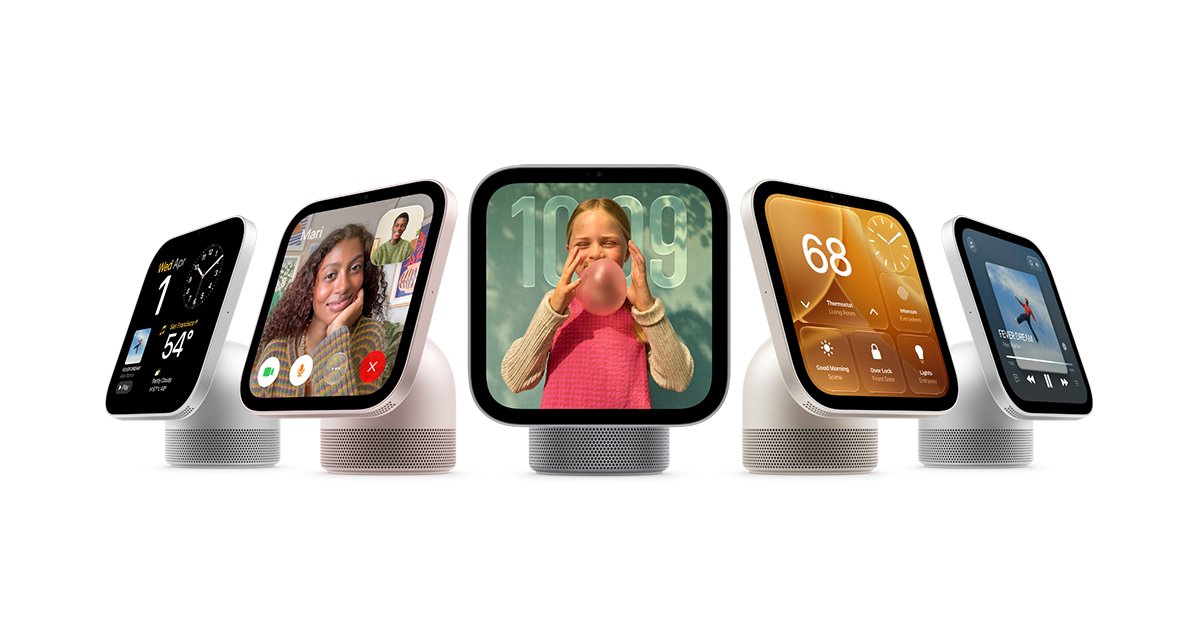
Apple's been sitting on a home hub rumor for years. Maybe since 2018. But the device that finally leaked this week, HomeView, isn't the Siri speaker I expected. It's a wall-mounted screen designed to be the command center for your entire house. And I'm still trying to figure out if that's clever or just late.
The pitch is straightforward: HomeView keeps your whole home connected, entertained, and in the know, all in one place. It runs a new Siri that supposedly understands context now. Though Apple's own materials include the phrase "usage limits may apply," which tells you everything about how this will actually work when your family tries to use it. I've seen this movie before.
What interests me isn't the hardware. It's the bet Apple is making about where computing lives when you're not holding a phone. For a company that built an empire on personal devices, sticking a screen in your kitchen is a strange shift. It suggests they think the future of the smart home isn't in your pocket. It's on your wall.
Privacy by Design (For Once)
Apple processes facial recognition and activity detection entirely on-device using the Neural Engine. When the camera spots a face or the microphone picks up a keyword, the analysis runs locally through Core ML and the Vision framework. No video frames upload to iCloud, and no audio clips go to Apple's servers for transcription. The A17 Pro's Neural Engine handles up to 35 trillion operations per second, which is enough to run face detection models in real-time without waking the main CPU. This architecture means the device works even when your internet is down, and it means Apple doesn't have your footage.
import Vision
import CoreImage

// Face detection runs on the Neural Engine with zero network calls
// The image never leaves the device's secure enclave
func detectFaces(in image: CIImage) -> [VNFaceObservation] {
    let request = VNDetectFaceRectanglesRequest()
    let handler = VNImageRequestHandler(ciImage: image, options: [:])

    try? handler.perform([request])
    return request.results ?? []
}
The hardware includes physical indicator lights wired directly to the sensor power circuits. A green LED glows when the camera is active, and an amber light turns on when the microphone is listening. These aren't software toggles you can spoof with a bug; if the light is off, the sensor is electrically disconnected from the power rail. You can verify privacy with your eyes instead of trusting a settings menu.
This approach differs from the Google Nest Hub and Amazon Echo Show, which send voice queries and video frames to cloud servers to personalize ads and improve their models. The Nest Hub displays targeted advertisements on its lock screen based on your search history. When Apple announced their privacy features, one critic wrote "Another surveillance ad billboard! Think different!" It's a fair jab at the marketing, but the hardware kill switches are genuinely different from Google's software-only toggles. The trade-off is app support. Early testers asked "Not clear if it can run iOS apps at all?" The device runs a restricted version of tvOS rather than full iOS, which limits the attack surface but frustrates developers who want to port existing apps.
Software That Finally Makes Sense
We've spent twenty years training ourselves to think like software. Memorizing where the export button hides, learning which keyboard shortcut triggers a specific state, internalizing the arbitrary logic of someone else's mental model. That friction is starting to invert. The software is beginning to parse your intention instead of forcing you to parse its architecture. It's a small shift in the interface and a large one in who gets to use these tools without a manual.
I think this matters most for the people who were never meant to be power users but needed power-user tools. The biologist running an analysis pipeline, the ops manager wrangling a config file, the designer trying to prototype something interactive without learning JavaScript. For them, this genuinely lowers the barrier. But I'm watching the people who built their expertise around that friction. The engineer who knows seventeen undocumented workarounds, the consultant whose value is navigating the labyrinth. They're not celebrating. Complexity has always been a moat, and some people are about to find the water rising on the other side.
The real test isn't whether simple things become simple. It's whether complex things stay coherent. Right now, legible software tends to break down the moment you need to do something non-standard,when you're debugging a race condition or orchestrating a workflow that doesn't fit the template. I'm betting we'll see a bifurcation: tools that are simple because they do less, and tools that are powerful because they're opaque. The middle ground,software that makes sense and can handle real complexity,is where the interesting failures are going to happen.
Living With HomeView
The difference here isn't the hardware specs—it's the assumption that you want your home to talk back to you constantly. We've spent a decade pushing notifications off our phones and into the background; HomeView moves them back into your field of vision, which is either liberating or exhausting depending on whether you trust the device not to show you an ad for the cereal you mentioned last night. The real test isn't the demo of seeing your calendar float over your coffee maker. It's whether you still use it in month three, when the novelty wears off and the thing is demanding Wi-Fi access at 6 AM because it wants to update.
I think the people who benefit most aren't the enthusiasts who pre-ordered, but the folks with specific accessibility needs—the ones for whom reading a screen is difficult and voice assistants are too imprecise. For everyone else, this is a convenience that solves a problem we've already managed with less intrusive means. The friction of calibration, the social weirdness of wearing a display in your kitchen when guests are over, the battery anxiety when you realize the thing needs two hours of charging every evening—these aren't launch-week bugs. They're structural.
What I keep coming back to is who controls the gaze. Advertising is the default business model for attention, and HomeView puts that attention in the one place we haven't fully monetized yet: the space between your eyes and your refrigerator. If this works, we're not just adopting a new interface. We're agreeing to a new geometry of the home, where every surface is potentially a screen and every glance is data.
Conclusion
Apple finally built the thing HomeKit always needed: a dedicated screen that lives where you actually are. After years of asking "but where do I control it?" the answer is apparently "your wall," and honestly, that's not nothing. The six-person recognition is technically impressive, though there's something slightly unsettling about a device that knows exactly who's standing in front of it and tailors the experience accordingly. It feels less like convenience and more like the first step toward a house that treats you like a customer profile.
But here's the rub: "Siri AI" with "usage limits may apply" is Apple-speak for "this works great until it doesn't, and then you'll pay." After a decade of HomeKit promising seamless, privacy-first automation, finding out the intelligence layer comes with a meter is almost predictable—especially when "privacy by design" apparently means watching six people in your hallway. I'm still not sure if HomeView fixes the platform's fragmentation problem or just gives Apple another expensive rectangle to sell you while the underlying ecosystem stays as patchy as ever. My guess? It'll sell out to the faithful, change nothing for everyone else, and in eighteen months we'll be reading about the subscription tier that unlocks unlimited Siri requests for your thermostat.