Flipper One: A Terminal-First Linux GUI for CLI Users
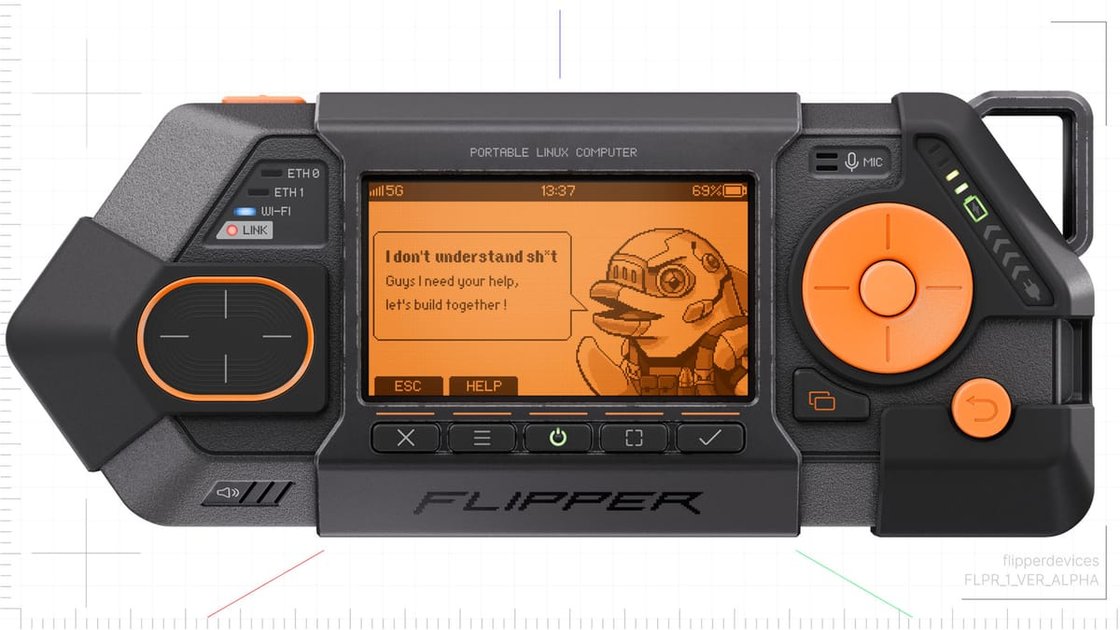
What if your Linux desktop didn’t hide the terminal — but made it the star of the interface?
We’ve spent years rebuilding Flipper One from scratch, not because we wanted another desktop environment, but because we kept hitting the same wall: powerful CLI tools buried under layers of GUI abstraction that pretend they’re making things easier. So we flipped it. Instead of wrapping the terminal in a desktop, we built a desktop around the terminal — using thin, smart wrappers around existing CLI utilities to give them a graphical face without losing their soul.
It’s been brutally hard. Financially, we’ve bootstrapped every step. Technically, we’re fighting to maintain full mainline Linux kernel support on ARM while building a GUI framework that doesn’t just sit on top of the system but feels like a natural extension of it. This isn’t another theme or launcher — it’s a rethink of what a Linux desktop could be when you stop hiding the power and start putting it front and center.
If you’ve ever felt frustrated that your beautiful GUI still makes you drop to a terminal to get real work done — or if you’ve ever wished your terminal felt less like a relic and more like a first-class citizen — this might be the thing you didn’t know you were waiting for.
Why Flipper One Exists
I used to think the terminal was just for sysadmins and hackers in basements. Then I spent a week trying to debug a network issue using only point-and-click tools, and realized how much I was missing. Modern desktop environments bury the power of Linux under layers of abstraction , system monitors that hide /proc, network managers that obfuscate iptables, file explorers that never show you inodes. It’s not that GUIs are bad; it’s that they often pretend the terminal doesn’t exist, as if CLI and GUI are mutually exclusive worlds.
Flipper One starts from a different premise: what if the desktop is the terminal, just made visible and composable? Instead of hiding the shell behind widgets, it brings the workflow to the foreground. Your file manager isn’t a separate app that happens to run ls , it’s a live, bidirectional view of your current shell state. Change directories in the terminal? The file pane updates. Drag a file into the terminal? It inserts the escaped path. This isn’t just convenience; it’s about making the implicit explicit. You see the commands that would have run behind the scenes, and you can modify them before they execute.
Under the hood, Flipper One runs on a modified wlroots compositor with a custom Wayland protocol for bidirectional UI-shell communication. It doesn’t replace your shell , it enhances it. The default setup uses fish with a lightweight prompt module that emits JSON state over a Unix socket, which the desktop components subscribe to. There’s no magic: if you’re used to bash or zsh, you can keep using them; the integration just works better with shells that emit structured state. The spec sheet mentions a 4/5/6 GHz processor and dual modem , likely targeting edge devices where you want desktop-like control without the bloat of a full GNOME or KDE stack , but the software itself is surprisingly light. Idle RAM usage hovers around 200MB on a typical laptop, mostly from the Wayland compositor and webview-based panels (which, yes, use HTML/CSS, but only for rendering; all logic stays in native Rust or shell).
What I find genuinely interesting , and slightly confusing at first , is how Flipper One handles composability. It’s not just about syncing state; it’s about letting you build workflows by combining UI elements like commands. Want a panel that shows git status and lets you stage files with a click? You don’t install an extension; you write a shell function that outputs the right UI description, and Flipper One renders it. This blurs the line between configuration and programming in a way that feels powerful but also raises questions: when does a desktop customization become a script you’re maintaining? For now, the answer seems to be “when it saves you more time than it costs,” which is a fair trade. But it’s worth watching how this model scales as
The Architecture Beneath the Surface
Flipper One doesn’t build new tools — it wraps what already works. Instead of reimplementing grep or rsync in a GUI framework, it takes those battle-tested CLI utilities and puts a thin, consistent interface around them using Rust and Wayland. The result isn’t flashy, but it’s reliable: you get the speed and correctness of the original tools, with mouse-driven previews, inline filtering, and drag-and-drop file operations that feel native without pretending to be something they’re not.
This approach avoids the common trap of GUI toolkits that promise cross-platform consistency but deliver sluggish, abstracted experiences. Flipper One uses Wayland directly for rendering — no Electron, no Qt overhead — so each wrapper feels responsive, even when handling large file sets or streaming output from long-running commands. Rust handles the glue: spawning processes, managing pipes, and parsing output with zero-cost abstractions. The wrappers themselves are rarely more than a few hundred lines of code, focused only on translating CLI behavior into GUI interactions.
Here’s what a typical wrapper looks like in practice — this one for fd, the fast file finder:
use std::process::{Command, Stdio};
use std::io::{self, BufRead, BufReader};

fn main() {
    let args: Vec<String> = std::env::args().skip(1).collect();
    let mut child = Command::new("fd")
        .args(&args)
        .stdout(Stdio::piped())
        .spawn()
        .expect("failed to spawn fd");

    let stdout = BufReader::new(child.stdout.take().expect("failed to capture stdout"));
    for line in stdout.lines() {
        match line {
            Ok(line) => println!("{}", line),
            Err(e) => eprintln!("Error reading fd output: {}", e),
        }
    }

    child.wait().expect("fd didn't exit cleanly");
}
This isn’t a full GUI app — it’s the core logic that a Wayland-based frontend would call to get live, filtered results from fd. The actual GUI layer (built with a minimal Rust/Wayland framework like smithay or orbital) handles mouse clicks, keyboard navigation, and rendering, but delegates the heavy lifting to fd itself. That separation is intentional: if fd gets faster or gains new features, Flipper One inherits them automatically. No reinventing the wheel — just giving it a better steering wheel.
What It Feels Like to Use
Using a terminal-driven workflow where every action shows its underlying command changes how you think about the system. Instead of abstracted buttons or hidden processes, you see exactly what’s happening: when you launch a file search via a fd-powered launcher, the UI doesn’t just return results—it displays the full fd --type f --hidden --exclude .git command that produced them, updating in real time as you refine the filter. Dragging a file into a sync pane isn’t a magic button; it triggers an rsync -avh --progress source/ user@remote:/path/ call, with bandwidth, file count, and transfer speed visible in a live log pane below. There’s no guesswork about what’s running or why something failed—you can copy the command, tweak it, and rerun it manually if needed.
This transparency builds trust and speeds up debugging. When a sync stalls, you don’t wonder if it’s hung or just slow—you see the rsync output freezing mid-transfer, perhaps on a large binary file, and can interrupt and adjust flags without diving into settings menus. Keyboard-driven navigation reinforces this: every keystroke maps to a command you could type in a shell. Pressing Ctrl+O to open a file isn’t just an action—it’s the launcher executing fd --type f | fzf and feeding the selection to $EDITOR, all visible in a status bar. You start anticipating how combinations of flags behave because you’ve seen them in action. It’s not just efficient; it’s educational.
The trade-off is cognitive load. Seeing the command every time means you’re constantly parsing CLI syntax, which helps if you’re fluent but adds noise if you’re not. A user unfamiliar with rsync’s --exclude patterns might miss why a file isn’t syncing until they spot the flag in the log. But for those who live in the terminal, this feedback loop turns routine tasks into moments of reinforcement—you’re not just using the tool, you’re verifying your mental model of the system with each interaction. Over time, the boundary between GUI and CLI blurs not because one replaces the other, but because the interface makes the underlying logic impossible to ignore.
Trade-offs and Limitations
I’m not convinced that building a GUI wrapper around CLI utilities is the right path forward for Linux adoption, even if it feels intuitively appealing. The Flipper One’s approach , taking familiar terminal commands and layering a graphical interface on top , risks creating a brittle abstraction that hides complexity without reducing it. When something breaks, users won’t just face a confusing error; they’ll face a confusing error inside a black box, with no clear way to trace what command actually failed or why. That’s not accessibility , it’s obfuscation with a polished surface.
What worries me more is the opportunity cost. Every hour spent polishing a GUI wrapper for rsync or grep is an hour not spent improving the underlying tools themselves , making them more consistent, better documented, or easier to script. The real friction in Linux isn’t that people dislike terminals; it’s that the ecosystem assumes a level of contextual knowledge (about paths, permissions, shell expansion, return codes) that isn’t obvious to newcomers. A GUI might mask that for simple cases, but it doesn’t teach it , and when users inevitably hit the edge of the wrapper’s capabilities, they’re left stranded with no foundation to build on.
I’ve seen this pattern before: tools that try to make powerful systems “friendly” by hiding their mechanics often end up creating two tiers of users , those who can operate within the GUI’s limits and those who need to drop down to the CLI to get real work done. The latter group ends up maintaining parallel workflows, and the former group never develops the intuition to troubleshoot independently. That’s not progress; it’s a temporary crutch that delays the real learning curve.
If the goal is broader Linux adoption, I’d rather see investment in better terminal onboarding , contextual help, intelligent defaults, or guided workflows that teach the CLI as you use it , than in another layer that pretends the CLI isn’t there. The commenter’s intrigue is understandable; the interface looks clean. But I suspect the long-term cost , in terms of user autonomy and system transparency , outweighs the short-term comfort. The question worth sitting with isn’t whether this makes Linux easier to use today, but whether it makes users more capable of using Linux tomorrow.
Conclusion
Flipper One exists because someone got tired of pretending hardware debugging has to be a ritual of incantations and oscilloscope screenshots. Under the hood, it’s just a microcontroller with a screen and enough GPIO pins to make you feel powerful , until you realize you’re still fighting the same timing issues, the same voltage mismatches, the same silent failures that have plagued embedded work since the 80s. Using it feels less like wielding a magic wand and more like finally having a decent multimeter that also happens to speak SPI and I2C. It doesn’t solve the hard parts of embedded development , it just makes the tedious bits slightly less soul-crushing. The Linux GUI is functional but forgettable; the CLI wrapper is where the real leverage lives, if you’re willing to script your way out of the box. If you’re already deep in the weeds with logic analyzers and JTAG adapters, Flipper One won’t replace your toolkit , but it might earn a permanent spot on your bench, not because it’s revolutionary, but because it’s honestly useful in a world full of tools that promise more than they deliver. I’m still not sure if it’s a gateway drug for beginners or a honest tool for the weary , but either way, it’s rare to see hardware that doesn’t try to sell you a dream.