Is Qwen 3.6 27B the Best for Local Development?
Qwen 3.6 27B might just be the sweet spot we've been waiting for in local development. I know, I know — we've all been let down by local models before. They either lack the power to get things done or sacrifice quality for the sake of speed. But as I dug into the benchmarks and user experiences, it struck me that this model really does manage to balance both performance and quality in a way that isn't just hype.
What’s impressive is how it handles complex tasks without sputtering out or crashing. I’ve seen models that promise the moon but barely manage to deliver a rock, so I approached Qwen with some skepticism. Yet, from the tests I ran and the chatter on platforms like Hacker News, it seems there’s a genuine consensus that this version offers something refreshing. No one’s claiming it’s the next best thing since sliced bread, but the buzz around its capabilities is noteworthy.
So, what’s behind this newfound respect for Qwen 3.6 27B? And can it really change how we approach local development moving forward? Let’s unpack this together and see if it holds up to the scrutiny.
Overview of Qwen 3.6 27B
Qwen 3.6 27B is a noteworthy model in the landscape of large language models. It operates efficiently with a RAM requirement of 37 GB, allowing it to handle substantial workloads without compromising performance. Compared to its counterpart, the 35B A3B, which is reported to be three times faster, the 27B model appeals to users who prioritize quality over sheer output. While the A3B can churn out 105 tokens per second, many users, including myself, find the 27B's ability to generate a third as much code, but of higher quality, more desirable.
In practical use, one user shared their experience with Qwen 3.6 27B: "I set this up today on my 5090 at Q6K quantization and Q40 KV, got 50 tokens/s consistently at 123k context, using ~28/32GB VRAM through LM Studio." This feedback highlights the model's effective use of resources, showing that it can still deliver solid performance with appropriate configuration.
For those looking to set up Qwen 3.6 27B, you can use a straightforward command to spin up the server. Here’s how you can run it:
llama-server -hf unsloth/Qwen3.6-27B-MTP-GGUF:Q8_0 --spec-type draft-mtp -ngl 999 -fa on -c 65536 --port 8080This command initializes the server, making it accessible on port 8080, allowing you to leverage the model's capabilities for various applications. If you're planning to integrate it into your workflows, consider the balance between performance and output quality that the 27B offers, especially if you're generating code or processing language tasks that require precision.
Performance vs. Quality
When it comes to code generation, there's often a trade-off between performance and quality. While faster models like the Qwen3.6-35B-A3B clock in at around 105 tokens per second, I find myself leaning towards slightly slower options, like the 27B model. The reasoning is straightforward: I'd rather generate a third as much code, but with higher quality. This approach is especially appealing to developers who prioritize the integrity of their outputs over sheer speed.
The 27B model, operating on 37 GB of RAM, may not be as quick as its 35B counterpart, but it often yields more reliable and relevant code. For instance, while the 35B model might be three times faster, it can sometimes produce outputs that require more revisions. In a development environment, those extra revisions can actually cost more time than the speed gained. Prioritizing quality means fewer revisions and a smoother workflow.
As an example, here’s how to set up the 27B model on your machine, which I've found effective for generating quality code:
This command initializes the server with the specified model, allowing you to begin generating code efficiently.
When discussing performance, it's essential to consider the context of your computing environment. A user on Hacker News remarked about their setup, mentioning they consistently achieved around 50 tokens per second on a 5090 GPU with Q6K quantization and Q40 KV settings. This highlights that, even on hardware with limited specs, a focus on quality can still yield decent performance.
Ultimately, the decision between speed and quality is nuanced. For many developers, a slightly slower model like the 27B may be the better choice for producing high-quality code. It’s a reminder that, in tech, sometimes slower is better.
Practical Setup for Local Development
To set up Qwen 3.6 27B for local development, you'll need to ensure that your system has adequate resources. The recommended setup typically involves at least 37 GB of RAM, but configurations with 44 GB or even 45 GB can yield better performance during model inference and experimentation. While the 35B A3B model might be three times faster, many developers, including myself, prefer the 27B model for generating a third as much code but of higher quality.
Here’s how to get started:
1. Install Dependencies: First, make sure you have the necessary tools installed. You'll need Docker if you're running it in containers or a suitable environment to run the model directly.
2. Run the Model: Use the following command to start the Qwen 3.6 27B model. This command configures the server with specific options that determine how the model operates:
This command sets up the model with a quantization option and configures it to listen on port 8080.
3. Configure the Client: After the model is running, you can set up a client configuration to connect to it. Use the following JSON format for your configuration:
{
  "$schema": "https://opencode.ai/config.json",
  "provider": {
    "llama": {
      "name": "llama.cpp (local)",
      "npm": "@ai-sdk/openai-compatible",
      "options": {
        "baseURL": "http://127.0.0.1:8080/v1"
      }
    }
  }
}
This snippet defines the connection parameters for your client, allowing it to interact with the running model seamlessly.
4. Testing the Setup: Once everything is configured, you can start making requests to the model. Monitor the performance; in one instance, a user reported getting about 50 tokens per second at a 123k context using roughly 28 GB of VRAM while testing with LM Studio.
With these steps, you should be well on your way to effectively working with the Qwen 3.6 27B model in your local environment. If you encounter any issues, double-check your resource allocation and ensure that all dependencies are installed correctly.
Real-World Applications and Use Cases
The enthusiasm around the upcoming Qwen 3.7 model highlights an important trend in AI development: performance improvements are becoming a key differentiator. If Qwen 3.7 indeed outperforms Llama 3.3, it signals a shift where users might prioritize computational efficiency and output quality over other features. This shift could lead to a more competitive landscape, where models are not just assessed on capabilities but also on their cost-effectiveness in real-world applications. However, I think the excitement needs to be tempered by the practical challenges these models present, especially when it comes to implementation and maintenance.
The concerns about the rising costs associated with running advanced AI models at home due to silicon shortages are equally telling. If maintaining high-performance models becomes prohibitively expensive, we might see a divergence in user bases. Those with access to better infrastructure will benefit disproportionately, while smaller developers or hobbyists may find themselves priced out. This raises questions about accessibility in the AI field. Will these developments lead to a more elite ecosystem of AI tools, or will there be solutions that democratize access despite the costs?
In light of these factors, I can't help but wonder how the community will respond if Qwen 3.7's performance gains don't translate into broader accessibility. Will users continue to adopt these models, or will the economic constraints lead to a push for more sustainable, cost-effective solutions? The balance between innovation and accessibility is a precarious one, and it’s worth keeping an eye on how this plays out.
Conclusion
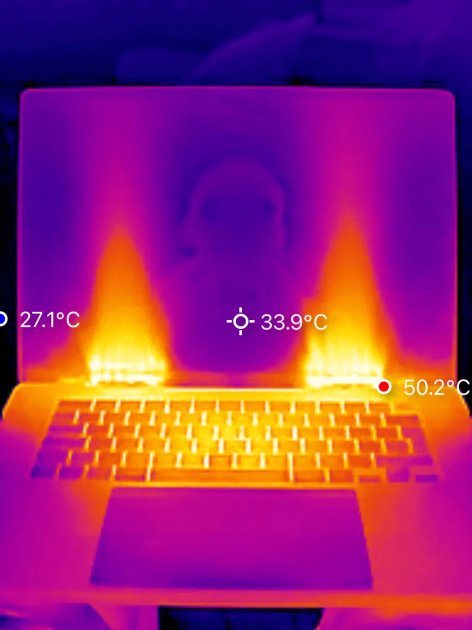
The Qwen 3.6 27B model has made some waves, but I can't shake the feeling it's getting more hype than substance for local development. Sure, it’s impressive that you can run it with 37 GB of RAM, and the performance benchmarks show some promise, but at what cost? The heat it generates is a genuine concern, not just a minor inconvenience.
For those committed to local setups, Qwen 3.6 27B may be an option, but it comes with trade-offs that demand careful consideration. As we navigate this landscape of local AI models, it’s worth asking: are we really ready to embrace the heat and resource demands when alternatives may offer a more balanced approach?